Our lab mainly works with ants in a synthetic environment. This
environment simulates their natural habitat in the trees, which helps us
understand how they might be moving between different nests of a tree. Cameras
set up around their enclosure capture their movements at specific areas in
their box, like when they cross bridges. This can lead to hours of video that
is impractical for humans to manually parse. A software pipeline built with
Python and MATLAB’s Motion-Based
Multiple Object Tracking Software helps analyze these videos and
extract useful data. My role in the lab has been to test and evaluate our Ant
Tracking pipeline and suggest ways for improving it.
Currently, I’m working on a problem
I call “blob coalescence.” This occurs when ants moving near each other on a
bridge are identified by the software as a single, large ant. In a situation
like this, the algorithm loses track of one of the ants and then reassigns it a
new ID after it leaves the vicinity of its neighbor. This is the equivalent of
an ant disappearing in the video and another one suddenly reappearing a couple
of seconds later.

Blob coalescence of
two ants
Why
does this happen and what can be done to fix it? I decided to dive into
MATLAB’s object
detection to find out. It turns out that there are only a few steps
in blob detection in an image:
1. Retrieve
a binary mask for the image
2. Perform
morphological opening on the image with a small structuring element
3. Perform
morphological closing on the image with a larger structuring element
4. Convert
holes in the image to foreground
5. Find
the coordinates, shape, and size of each blob in the image
The first step in blob
detection is the retrieval of a binary mask from the image. A binary mask is a
set of labels for each pixel in an image. If a pixel appears in the foreground
of the image, it is labeled with the value 1. Otherwise, it gets labeled with a
0. The collection of all such labels is a matrix identifying only the location
of moving objects in the image. In our pipeline, ants would then be labeled
with a 1 and their surroundings with a 0. I will refrain from going into detail
about how
you might produce the binary mask in the first place because I don’t
think it is important for the problem at hand. Rather, let’s dive into the next
steps, which apply morphological operations to the binary mask.

A binary mask
(right) for the ant pictured on the left
Once
we have retrieved a binary mask of the image, we perform morphological opening
to erode then dilate it. An erosion is
a way of transforming a binary mask to “smooth in” clusters of foreground
pixels. In an erosion, foreground pixels that are on the edge of a cluster of
foreground pixels are converted to background (by changing a 1 to a 0). The
algorithm for this uses something called a structuring element,
a very small binary mask representing the shape and size of an ant as a binary
mask. In our pipeline, a small 3x3 square of 1s is used.

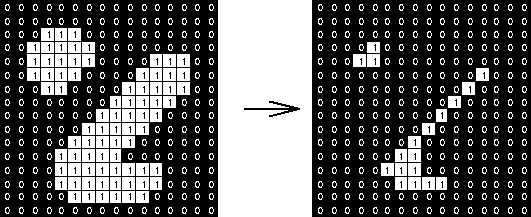
In erosion, the center of the structuring element is
superimposed over each foreground pixel in our image. Each time this is done, all
pixels that overlap with the structuring element are considered. If any of the
values of those pixels differ from those in the structuring element with which
they’ve been overlaid, our center pixel is classified as background (instead of
foreground). Thus, erosion with a structuring element of all 1’s has the effect
of keeping only the most central foreground pixels in a cluster.


Erosion with a 3x3
structuring element of all 1’s
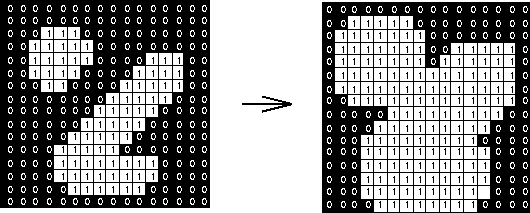
After erosion, image dilation is performed to “smooth out”
clusters of foreground pixels. Similar to erosion, dilation also superimposes the
center pixel of the structuring element over each pixel in the image. But
rather than converting foreground pixels to background if any of the
overlapping pixels are misclassified,
dilation converts background pixels to foreground if any of the overlapping
pixels are correctly classified (ie
they match with those in the structuring element). With a structuring element
of all 1’s this has the effect of expanding a cluster of foreground pixels so
that background pixels near the cluster are converted to foreground. In a
sense, dilation is the opposite of erosion.


Dilation with a 3x3
structuring element of all 1’s
The process of
performing an erosion followed by a dilation is known as morphological opening.
An easy way of visualizing a morphological opening is to imagine sliding the
structuring element around inside a cluster of foreground pixels. Any
foreground pixels that you would be unable to cover using the structuring
element will be converted to background.

Morphological
opening (light blue) of the dark-blue square by the grey disk
Likewise, morphological
closing is the process of performing a dilation followed by an
erosion. You can visualize this by sliding the structuring element around
outside the cluster of foreground pixels. Any background pixels that you would
be unable to cover using the structuring element will be converted to
foreground.

Morphological closing
(light blue) of the dark blue squares by the grey disk
Our pipeline performs opening with a small structuring element
and then closing with a larger structuring element so as to increase the size
of the originally detected blobs. The overall effect is to better generalize
the shape of the clusters of foreground pixels so that they can be more easily
recognized. In essence, we are reducing noise in the initial foreground
detections and expanding the size of the foreground shapes.
The last transformation
performed on our image is that of filling
holes. You can visualize this process by coloring the background of
an image starting at its edges. Any pixels that cannot be reached without
lifting your pen off the image are considered holes. The pipeline will convert
such images to foreground, so that there aren’t any background pixels
surrounded by foreground.

Filling Holes
After all transformations are complete, blob analysis is used to
extract the coordinates, shape, and size of the foreground regions. This step
allows us to discard foreground clusters that are too small or too large to be
an ant.
So why does the
algorithm merge the blobs of ants that get close to each other? My hypothesis
is that a dilation step causes the two foreground clusters to merge and a later
attempt at erosion fails to retrieve the background pixels between the two
ants. This could be because the structuring element we use when performing
morphological closing is too big to “fit” in the gap between the two ants.
Another possibility is that at some point, the gap between the two ants becomes
surrounded by foreground pixels. This would result in the “filling” of that gap
and its conversion to foreground.
Yet another idea might
involve altering our structuring element to better represent the shape of the
ant (rather than using a simple 3x3 matrix of 1’s). Although this might seem
like a promising solution, I’m worried about the ability of the ants to rotate
themselves in the video, which the structuring element itself cannot do. In
this case, you might think we’d benefit from having a structuring element even
smaller than the ant, but the usefulness of that approach is constrained by the
resolution of the video, since a single ant is only a few pixels wide in some
of our videos. Clearly there isn’t a single solution for all situations, but perhaps
these ideas will finally help me solve this simple but exasperating problem!
Further
Reading
MathWorks,
2018. “Detecting Cars Using Gaussian Mixture Models.” https://www.mathworks.com/help/vision/examples/detecting-cars-using-gaussian-mixture-models.html
MathWorks,
2018. “Motion-Based Multiple Object Tracking.” https://www.mathworks.com/help/vision/examples/motion-based-multiple-object-tracking.html
R.
Fisher, S. Perkins, A. Walker, and E. Wolfart, 2003. “Morphology.” https://homepages.inf.ed.ac.uk/rbf/HIPR2/morops.htm
Chen,
Xingyao, 2018. “MATLAB: Saving Students One Blob at a Time.” http://hmcbee.blogspot.com/2018/05/matlab-saving-students-one-blob-at-time.html
Media
Credits
[1]:
Photo produced by Arya Massarat when working with the pipeline.
[2]:
Photo by Xingyao Chen. http://hmcbee.blogspot.com/2018/05/matlab-saving-students-one-blob-at-time.html
[3]:
Photo produced by Arya Massarat using Google Sheets. Adapted from the Hypermedia
Image Processing Reference. https://homepages.inf.ed.ac.uk/rbf/HIPR2/figs/erodbin.gif
[4]:
Photo produced by Arya Massarat using Google Sheets. Adapted from the Hypermedia
Image Processing Reference. https://homepages.inf.ed.ac.uk/rbf/HIPR2/figs/diltbin.gif
[5]:
Public domain image. https://commons.wikimedia.org/wiki/File:Opening.png#/media/File:Opening.png

[6]:
Public domain image. https://commons.wikimedia.org/wiki/File:Closing.png#/media/File:Closing.png

[7]:
Photo by MathWorks. https://www.mathworks.com/help/images/ref/imfill.html?s_tid=doc_ta#buo3hpj-2
No comments:
Post a Comment